
Are you a club administrator, coach, or team captain? If so, you know the weekly struggle. The endless cycle of texts, emails, and WhatsApp messages just to find out who is available for the next game is a massive headache. This manual chasing doesn’t just drain your energy; it wastes valuable time that could be spent on coaching, strategy, or growing your club. Fortunately, there’s a better way.
Modern club management apps have transformed this painful task into a simple, automated process. By setting up automated availability reminders, you can eliminate the guesswork and get a clear headcount with almost zero effort. This guide will show you exactly how to leverage these tools, especially for those consistently unreliable players, and reclaim your week.
The Problem with Manual Chasing
Before diving into the solution, let’s be clear about the problem. Relying on group chats like WhatsApp for availability often leads to what we can call “admin chaos.” Responses get lost in long conversations, information is scattered, and you still end up manually tracking everything in a separate spreadsheet. This old method is inefficient and frustrating.
“Research shows that club managers who track availability manually can waste between 12 and 18 hours every single week.”

This is time spent on repetitive data entry instead of high-impact activities. Automation, on the other hand, centralizes all responses into a single, clean dashboard, giving you a real-time view of your squad instantly.
Choosing Your Automation Tool
The first step is moving from manual chasing to automated oversight. Different apps offer various levels of automation, so it’s crucial to pick one that fits your club’s needs. The goal is to set it and forget it.
Key “Set-and-Forget” Features
Look for apps with intelligent features designed to do the work for you. These systems go beyond a simple “in or out” poll and actively manage the communication process.
- Intelligent Follow-Ups: Instead of you checking who hasn’t replied, apps like SportEasy or Spond can be configured to automatically “nudge” only the non-responders at a set time, for instance, 48 hours before the event.
- Availability Polling: Core to apps like TeamSnap, this feature sends an automated notification for every event. Members can often reply with one tap directly from an email or push notification without even logging in. Learn more from this TeamSnap blog post about availability tracking.
- Unavailability Tracking: Members can proactively set “blackout dates” for holidays or mark themselves as injured. The system then automatically excludes them from requests during this period, reducing notification fatigue.
| App | Best For | Standout Automation Feature |
|---|---|---|
| Heja | High Automation | Sends multiple, automatic reminders without any admin action. |
| Spond | Grassroots & Social Clubs | Allows admins to set auto-reminders for non-responders at specific intervals. |
| TeamSnap | Competitive Youth Sports | Features a one-click “Send Reminders” button to nudge all non-responders at once. |
| Pitchero | One-Click Management | The Manager App can identify and prompt all “Not Set” players with a single tap. |
The “Hard Deadline” Workflow: Your Weekly Blueprint
Technology alone isn’t enough; you need a consistent process. The “Selection by Deadline” model creates a predictable weekly rhythm that trains your players to respond on time. Stop chasing individuals and let the system manage the timeline.
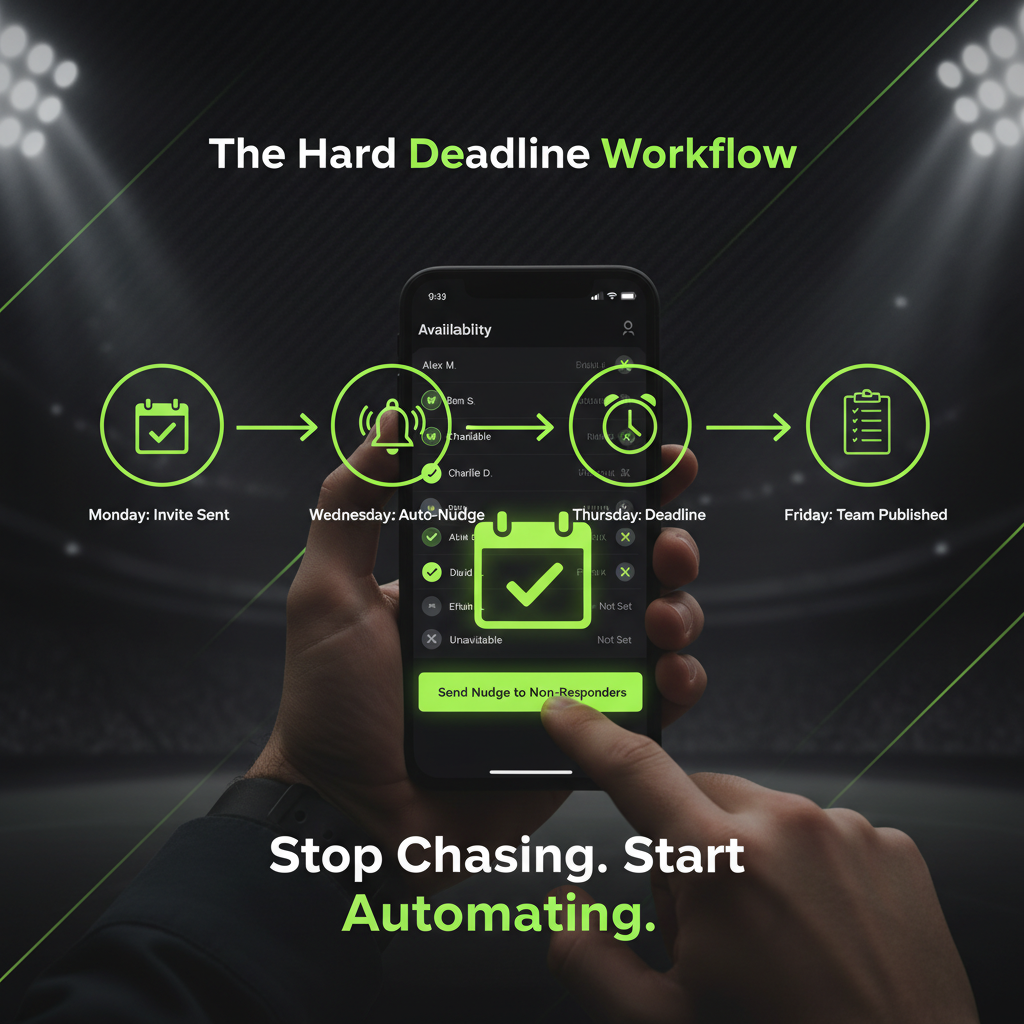
Monday
App sends invitation & availability request for the upcoming weekend.
Wednesday
“Nudge” feature automatically sends follow-up to non-responders.
Thursday (6:00 PM)
Hard Deadline. Final check of the availability dashboard.
Friday
Lineup published. “Not Set” status equals unavailable.
This workflow removes you from the role of chief reminder. The deadline becomes the authority, not you.
Beyond the App: Smart Tactics for Unreliable Players
While automation handles the logistics, a little social psychology can solve the root problem of unresponsiveness. For those players who ignore even the most persistent automated reminders, you need a clear team policy.
The Selection Penalty
This is the most effective tactic. State clearly in your team charter or pre-season meeting: “If you do not confirm your availability by the Thursday deadline, you will not be in the starting lineup on Saturday. No exceptions.” When a key player has to sit on the bench once because they couldn’t be bothered to tap a button, the message is received loud and clear. They rarely forget again.
Use Social Proof and Gentle Nudges
- Make it Visible: Once most of the team has responded, post a screenshot of the availability list in your team chat. Seeing a long list of “Available” green ticks creates a powerful psychological urge for laggards to conform.
- Leverage “Read Receipts”: Apps like Spond show you who has seen an invite. If an unreliable player has viewed it but not responded, a public (but friendly) message works wonders.
- For Youth Sports – The Parent Loop: If your players are young, ensure the app notifies both the player and a parent. Often, the parent who manages the schedule will ensure a response is logged.
Conclusion: Reclaim Your Time
Switching from chasing players to implementing an automated system is a game-changer. It saves you countless hours, reduces stress, and makes your club run more professionally. By combining the power of a club management app like Spond or TeamSnap with a firm “Hard Deadline” workflow and smart team policies, you create a culture of accountability.
The result? You get to stop being an administrator and start being a coach, a leader, and a strategist again. You can finally focus on what truly matters: growing your club and enjoying the sport. For more insights on digital tools for sports teams, you might find this official Pitchero blog on team management useful.